cors problems
MDN Has VERY good documentation :
Also wikipedia has shorter, to-the point docs :
klopt
We get problem accessing data on development (at least) because we have two sources :
- the frontend is at http://localhost:80
- the backend is at http://localhost:4200
This leads me to conclude that we will have the same problem in production.
Quick fix
To be short: you can just ask apache to allow (1) other origin, which is not much but it will suit most of our needs.
The backend server does use different ports but it always communicates with apache through the same. So this solution works.
Header set Access-Control-Allow-Headers *
Header set Access-Control-Allow-Origin http://localhost:4200
Header set Access-Control-Allow-Methods *
No need to make the Origin header * as well since we know what it always is.
proxy
Does not the proxying solve this ? The setup of local development is like this.
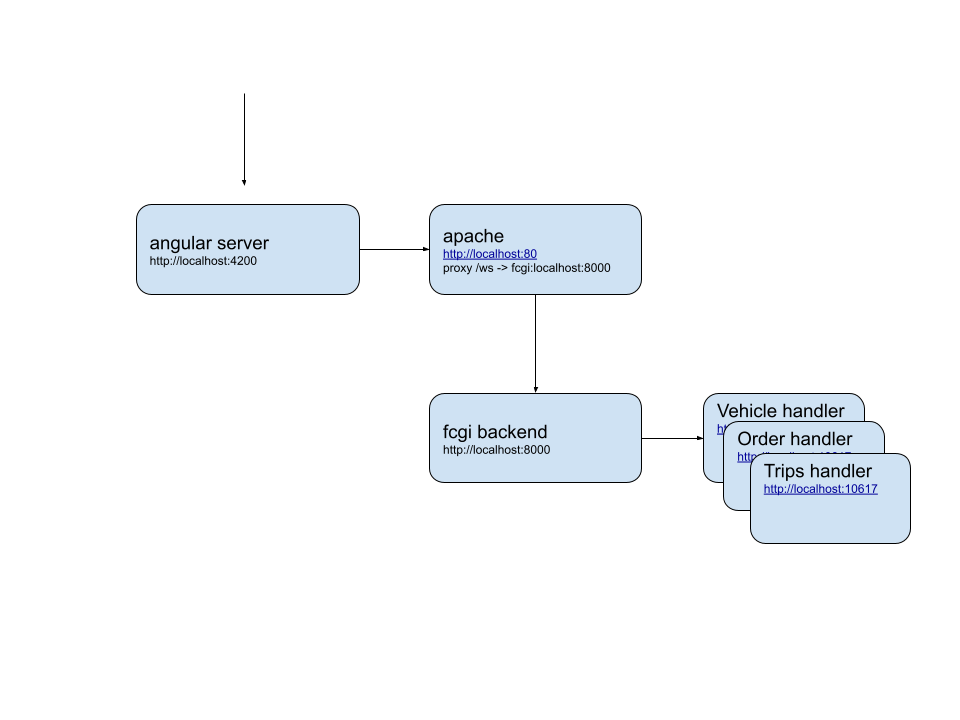
Note that it is slightly different, since angular server also has a proxy config redirecting what we send to
localhost:4200/ws/ to apache : http://192.168.1.151/ws/
{
    "/ws/*": {
    "target": "http://192.168.1.151",
    "secure": false,
    "logLevel": "debug",
    "changeOrigin": true
  }
}
Apache then also proxies the content to fcgi:6666 with this config
So in development now the route of a request is
- chrome webpage at http://localhost:4200
- GET/POST request to http://localhost/ws/...
- proxy.config.json(for ng) relays that to apache http://127.0.0.1/ws
- apache proxy sends /ws -> fcgi://localhost:6666
- localhost:6666 is where debug/backend runs.
Note that we do not have CORS problems anymore,that is probably due to this setting in the apache config file :
  Header set Access-Control-Allow-Headers "*"
  Header set Access-Control-Allow-Origin "*"
  Header set Access-Control-Allow-Methods "GET, POST, PUT, PATCH, DELETE, OPTIONS"
In production the setup is different: there will be no development server and the main web page is served through apache. The CORS problem might be solved in that way, try it out on a docker image !.