tinnitus
Here are some finding with regard to tinnitus treatment.
finding tinnitus tone
On this site, it definitely seems to be
F8 ---- 11175 Hz to loo F# Gb 8 -=> 11839 Hz G8 ---- 12543 Hz to hi (maybe not !! just try this as well !?) A8 ---- unhearable, so too high
Here is an alternate way of generating the 'gap' :
ffmpeg -i inputfile.mp3 -filter:a "equalizer=f=1000:t=h:w=2:g=-90, equalizer=f=1500:t=h:w=10:g=-90" outputfile.mp3
ffmpeg
The first tinnitus wave i had was a much lower frequency and it fell within the range of normal mp3 songs. So that gave reason to alter all my mp3 files with the following script (~/bin/tinnit.sh)
#!/usr/bin/env bash

#mkdir -p 9680 # 2022 ? i thought this was the tone
mkdir -p 11839 # 2025, it certainly seems more like this

for file in *.mp3
do
    #ffmpeg -i "$file" -af "bandreject=f=9680:width_type=h:w=600:mix=1" "9680/${file}"
    ffmpeg -i "$file" -af "bandreject=f=11839:width_type=h:w=600:mix=1" "11839/${file}"
done
However doing this and viewing it with spectrum3d it shows that it is completely out of the bandwidth. so mp3 altering is of no use.
sox
Then over to sox to generate white noise that does cover the range. First generate random noise (100 seconds)
Then we can cut the gap at 11839 with a command like this, and save it as mp3
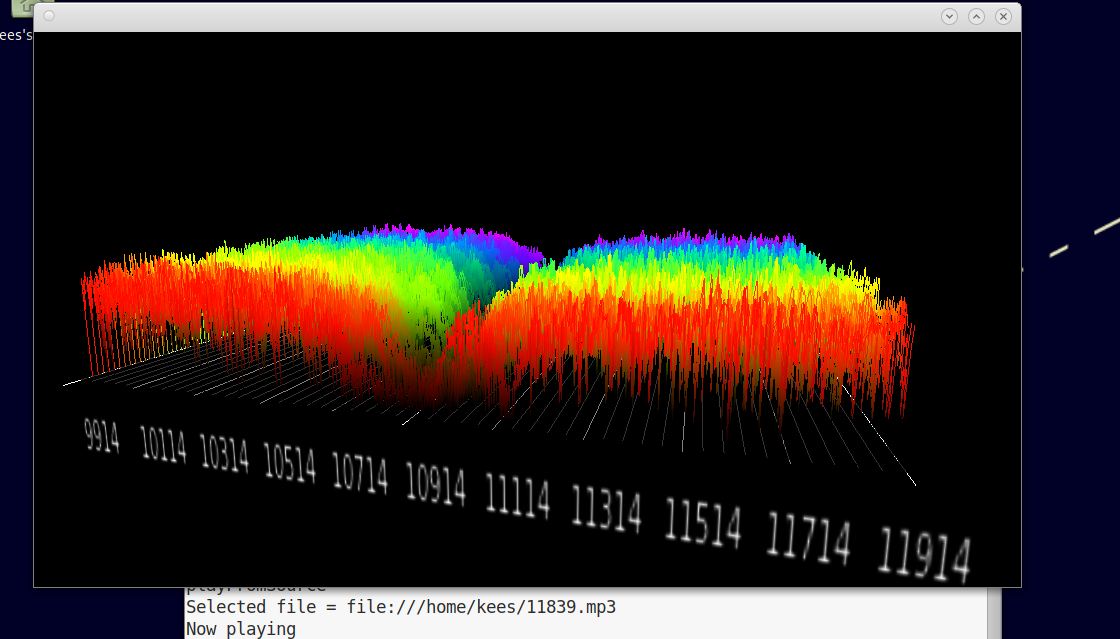
Play it and i really think after two runs it is already better !!! Let's see how it looks with spectrum3d :
spectrum3d
This does not seem to compile and run on debian 12, so i stepped back to debian 11. That means a number of steps sadly.
First create a VM with vagrant.
Add yourself as user otherwise you can't login to MATE :
Then it roughly takes these steps, probably more.
apt-get install mate-desktop-task
apt-get install make gcc
apt-get install gtk-3.0
apt-get install libsdl-dev
apt-get install libgstreamer-1.0
./configure
make
cd src/
vim Makefile  # and add -fcommon to the CFLAGS
make
sudo make install
spectrum3d
In spectrum3d you can open the 11839.mp3 file and see :